
Security
Security and data handling
Dooxout enforces its limits on the server, not in a prompt. It encrypts the secrets it stores, writes an audit log and suppresses addresses that unsubscribe or complain for good. An AI agent can read your caps and budgets but cannot change them.
Security topics
Limits live on the server
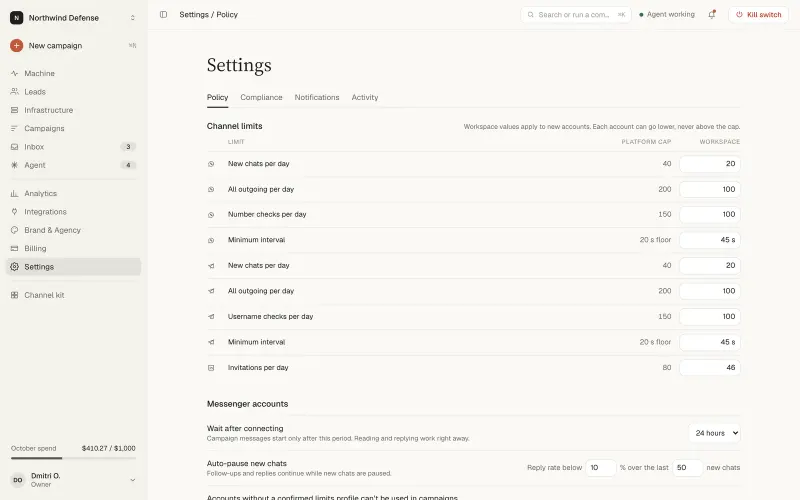
Caps, budgets and approvals are checked by the server on every send. A single policy check sits behind the console, the API and the MCP server, so all three apply the same rules. The policy covers daily caps, automatic freezing when bounces or complaints pass a threshold, budgets, approval gates and a kill switch.
What an agent can and cannot do
An agent connected over MCP can read the policy. It cannot change it, and no tool exists for that.
| Action | Agent |
|---|---|
| Read caps, budgets and approval rules | Yes |
| Change caps, budgets, autonomy level or approval rules | No. A person with the right role does it in the console |
| Buy domains or mailboxes (SDR agent) | No. It recommends, a person buys |
| Start the first campaign | Only after a person approves |
| Override a failed deliverability check | No |
| Lift a suppression | No |
Text from outside, such as replies, websites and lead notes, is treated as data and screened before an agent reads it, so it cannot give the agent instructions.
Secrets and encryption
Secrets such as mailbox passwords and API keys are encrypted at rest with envelope encryption: AES-256-GCM, a fresh nonce for every encryption and a key derived separately for each table and column. Each envelope is bound to its record and workspace, so moving it to another row or workspace fails authentication. The format is versioned and carries a key identifier,, and stored secrets can be re-encrypted when a key is rotated.
API tokens are stored only as hashes. The secret is shown once when you create it, and revoking a token is checked on every call. Unsubscribe and tracking links use signed opaque tokens with no personal data in the address.
Audit log
Every action is written to an audit log: campaign start, pause, resume and stop, deliverability overrides, suppression changes, and changes to sending identities and mailboxes. Each entry names the actor, a person or the system, and calls made by an agent are recorded with the token and the user who owns it.
Secrets never reach the log, and a settings change records only which fields changed. Workspace admins can read the log.
Roles and per-domain access
Access is role based. Admins act across the workspace, while managers and operators work only on the sending domains they are granted. An agent token inherits the role and domain access of its owner and can be narrowed further. In an agency account, clients get read-only or approval access to their own workspace only.
Suppression you cannot turn off
Unsubscribes and complaints are never contacted again. An address that unsubscribes or complains is suppressed in that workspace across every channel: email, phone, LinkedIn and Telegram. The client cannot disable the rule, and neither can an agent, a lead search or a deliverability override.
Only the recipient, by subscribing again, or a workspace admin with a reason on record can lift a suppression. Outbound email supports one-click unsubscribe.
Where data lives
In the EU.
External processing
The reply classifier is optional and off by default. When it is on, it reads replies only to sort them by intent and draft answers, which means reply text is processed by an external AI service. It is switched on per workspace.
Responsible use: the platform warns, you decide
Dooxout gives you tools and does not block lists or sending sources. When you pick a cold list on your own mailboxes or on your own SparkPost or Elastic Email account, the platform warns about what can happen and recommends a safer setup, and you confirm once that you take responsibility. The confirmation is recorded in the audit log.
You own the lists you upload and the accounts you connect, and you are responsible for having a legal basis to contact the people on them. Caps and auto-pause are on by default, and changing them needs a logged confirmation. LinkedIn, WhatsApp, Telegram and mailbox providers can restrict accounts; our defaults are conservative, not a guarantee.
This page describes how the product behaves. It does not claim a third-party certification or audit report.
Related: the MCP quickstart, pricing, integrations, compare, the blog and the home page.
Security questions
Can an AI agent change my sending limits?
No. An agent can read caps and budgets, but changing them needs a person with the right role.
How are secrets such as mailbox passwords stored?
Encrypted with AES-256-GCM in an envelope that is bound to its record and workspace. A copied value does not decrypt anywhere else, and API tokens are stored only as hashes.
Can I turn off suppression?
No. Addresses that unsubscribe or complain are never contacted again from that workspace, in any channel. It is the one rule that cannot be switched off.
What does the audit log record?
Campaign starts, pauses and stops, overrides, suppression changes, and changes to sending identities and mailboxes. Secrets are never written to it.
Is the reply classifier on by default?
No. It is optional and off by default. When it is on, reply text is processed by an external AI service to sort replies by intent and draft answers.
Ask an engineer about the details
Create an account and review the controls yourself, or contact us and bring your security questions.