
Sign-up openCold email automation platform for AI agents
Cold outreach, run by an agent. With guardrails.
An agent finds leads, plans the sequence and handles replies. You set the limits, budgets and approvals. The server enforces them, not a prompt.
Works with Claude, Cursor and any MCP client
How it works
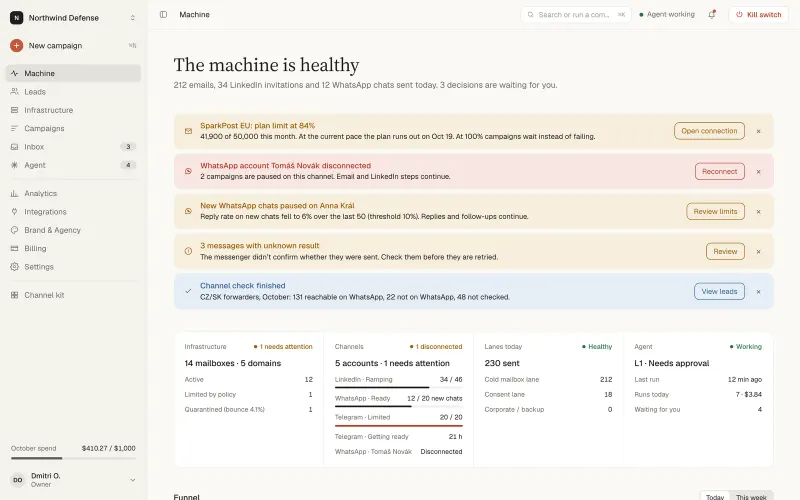
One loop, from lead to reply
Cold email automation from the first list to the last reply, with sending infrastructure, sequences and an inbox in one place.
- 01
Leads
Import a CSV, pull from LinkedIn or let the agent build a list from your criteria.
- 02
Domains & mailboxes
Cold email infrastructure: separate sending domains with DNS checked before the first send.
- 03
Sequences
Steps, delays and variables planned by the agent, reviewed by you.
- 04
Channels
Email, LinkedIn, WhatsApp and Telegram in one sequence.
- 05
Replies
Replies sorted by intent. Out-of-office and bounces stop the sequence.
- 06
Report
Sent, delivered, replied and spent. Counted, not estimated.
Three things we do differently
Outbound sales automation that an AI agent can run without being trusted with the limits.
Guardrails in code
Caps, budgets and approvals are checked by the server on every send. An agent cannot talk its way past them.
One loop from lead to reply
Leads, mailboxes, sequences and replies live in one place, so the agent sees the whole picture and so do you.
Honest metrics and pricing
No inbox-placement promises. Reports show what was sent, delivered and replied, and the prices are on the pricing page.
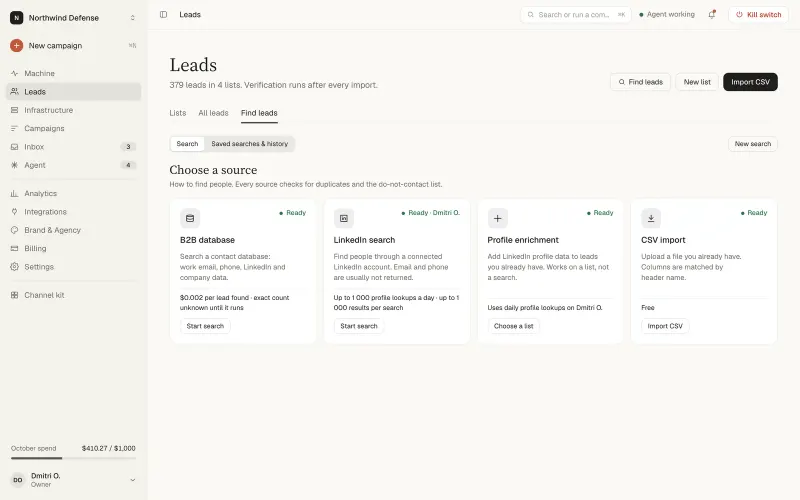
Leads
Lists you can trust before the first send
Bring your own leads. The agent de-duplicates, verifies and drops anyone on your suppression list.
- CSV import: map columns once, reuse the mapping on the next file.
- Suppression list: unsubscribes and complaints are never contacted again. This rule cannot be turned off.
- Email verification and enrichment: risky addresses flagged before they hurt a domain.
For agents · Email MCP server
Your agent already knows how to use it
Connect Claude or Cursor to the Dooxout email MCP server. Every tool call goes through the same limits as the console.
// running campaigns, then pending replies
call campaigns.list({ status: "running" })

→ [{ id: "…", name: "Fintech CTOs, EU", status: "running",
     step_count: 3, audience_summary: { enrollment_count: … } }]

call inbox.list_pending({ limit: 10 })

→ { data: [{ thread_id: "…", lead_email: "m.novak@…",
classification: "interested" }], next_cursor: null }- campaigns.list
- inbox.list_pending
- campaigns.preflight
- suppression.add
Guardrails
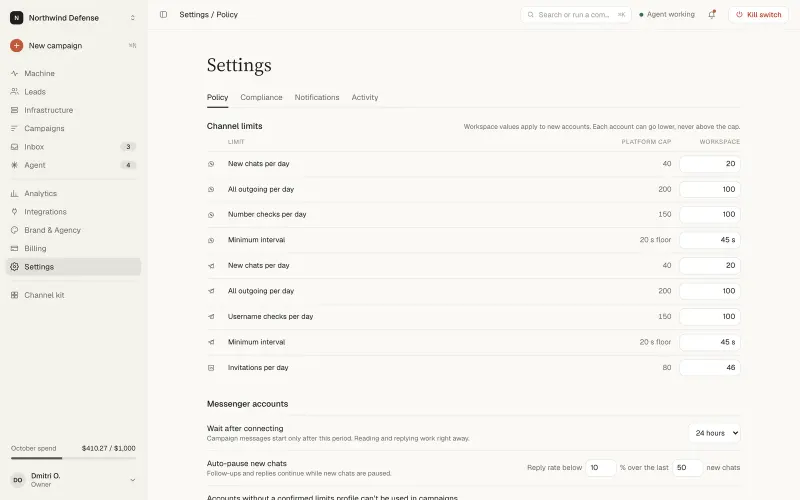
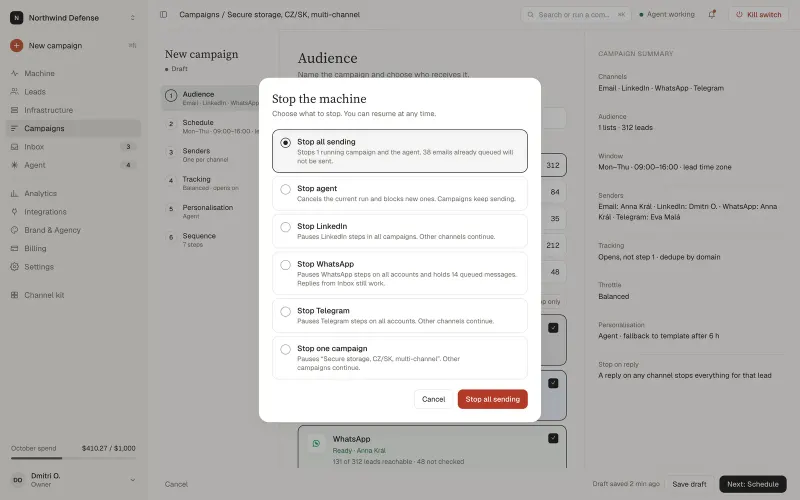
Limits the agent can read, but not change
Set a policy once. Every send is checked against it on the server, so an AI outbound sales agent stays inside your limits.
- Caps per mailbox, domain and channel, for example 40 a day per mailbox.
- A monthly budget, for example 200 euro, and approvals on the first step and every reply.
- A kill switch that stops all sends, or just one channel or campaign.
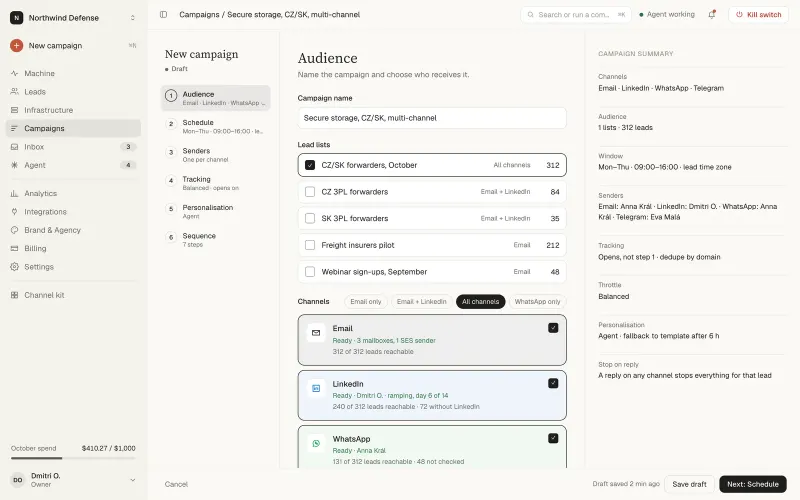
Multichannel outreach
Four channels, one sequence, one inbox
Multichannel outreach from a single sequence, with replies from every channel landing in the same inbox.
- Email: Gmail, Outlook and any SMTP and IMAP server.
- LinkedIn: visits, invites, messages.
- WhatsApp and Telegram: messages and follow-ups.
Limits and caveats. Messenger platforms can restrict accounts that send cold messages. Our limits are conservative defaults, not a guarantee that an account stays unrestricted.
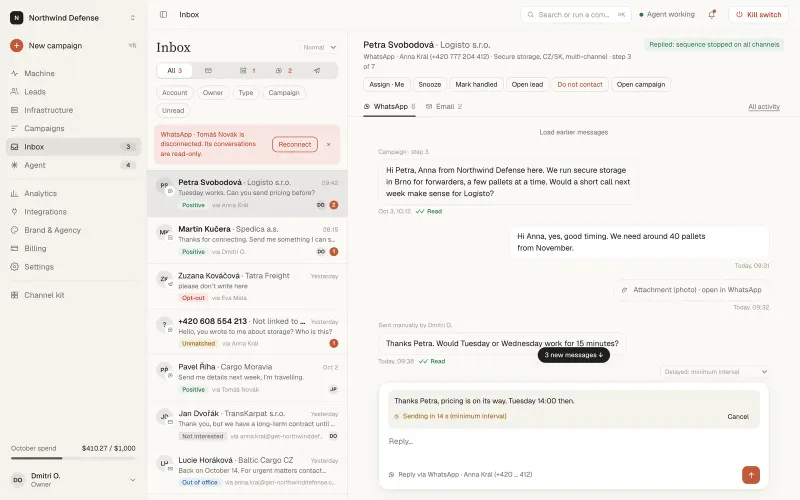
Replies
Start more conversations, keep the ones that matter
Every reply lands in one inbox, across all mailboxes and channels. The agent sorts by intent and drafts answers; you approve what goes out.
- Google and Microsoft mailboxes over IMAP.
- Bounces, out-of-office and unsubscribes stop the sequence.
- Reply classifier is optional and off by default.
For agencies
Run outreach for every client, under your brand
Each client gets a separate workspace with its own budget, domains and policy. One client's mistakes never touch another's reputation.
Client workspaces
Roles and per-client budgets.
Your brand
Logo, colours and your own domain.
Client reports
Shareable, read-only, white-label.
Own domain
Clients log in at your address.
Integrations
Plugs into the stack you already run
- REST API
- MCP
- HubSpot
- Pipedrive
- Slack
- Calendly
- Zapier
- Make
- SMTP
- IMAP
- Gmail
- Outlook
Get started
See it run on your own leads
Create an account and a workspace you keep. Guided setup takes you through it.
- 01
A workspace with your domain
Guided setup checks DNS and connects a mailbox.
- 02
Your agent, connected over MCP
Claude or Cursor plans a first sequence on a sample of your leads.
- 03
A policy that fits your risk
Caps, budget and approvals set before anything is sent.
Sign up with Google, LinkedIn, Discord or your email.
Questions first? Contact us.
Questions
How do I get started?
Create an account at app.dooxout.com with Google, LinkedIn, Discord or your email. You get a workspace you keep. If you want to talk first, use the contact form and an engineer replies within one business day.
What is cold email infrastructure?
It is everything on the sending side: separate sending domains, mailboxes with SPF, DKIM and DMARC in place, per-mailbox caps and monitoring. In Dooxout the DNS is checked before the first send, and new mailboxes start with low caps. See security for how limits are enforced.
Can an AI agent run cold email through MCP?
Yes. Claude, Cursor or any MCP client can list campaigns, read replies, request approvals and read the policy through the Dooxout MCP server. Every tool call goes through the same server-side limits as the console, and the agent cannot change them. Start with the MCP quickstart.
Is there warm-up?
No. Automated warm-up networks fake engagement and mailbox providers detect them. New mailboxes start with low caps that rise slowly instead.
Does it support multichannel outreach?
Yes. Email, LinkedIn, WhatsApp and Telegram run in one sequence with one inbox for the replies. Messenger platforms can restrict accounts that send cold messages, so the limits are conservative defaults, not a guarantee.
Who is responsible for messenger and mailbox limits?
You are, as the account owner. LinkedIn, WhatsApp, Telegram and mailbox providers can restrict accounts. Our defaults are conservative, but they are not a guarantee.
Where does my data live?
In the EU. Secrets such as mailbox passwords and API keys are encrypted at rest, and every action is written to an audit log.
What does the reply classifier do with reply text?
It reads replies only to sort them by intent and draft answers. It is optional and off by default.
Can the agent change my limits?
No. Agents can read caps and budgets through MCP, but changing them requires a person with the right role in the console.
Which mail providers can I connect?
Gmail and Google Workspace, Outlook and Microsoft 365, and any other mailbox over SMTP and IMAP. The full list is on the integrations page.
How does pricing work?
Five plans from EUR 26 a month on annual billing (EUR 32 on monthly billing), excluding VAT. A plan prices the software: sending volume, leads, LinkedIn accounts and, on the Agency plan, client workspaces. Domains and mailboxes you buy through Dooxout are billed separately. See all prices on pricing.
Hand outreach to an agent. Keep the keys.
Create an account, connect a mailbox and run your first campaign.